
Your Zen Desktop Companion & Focus Timer
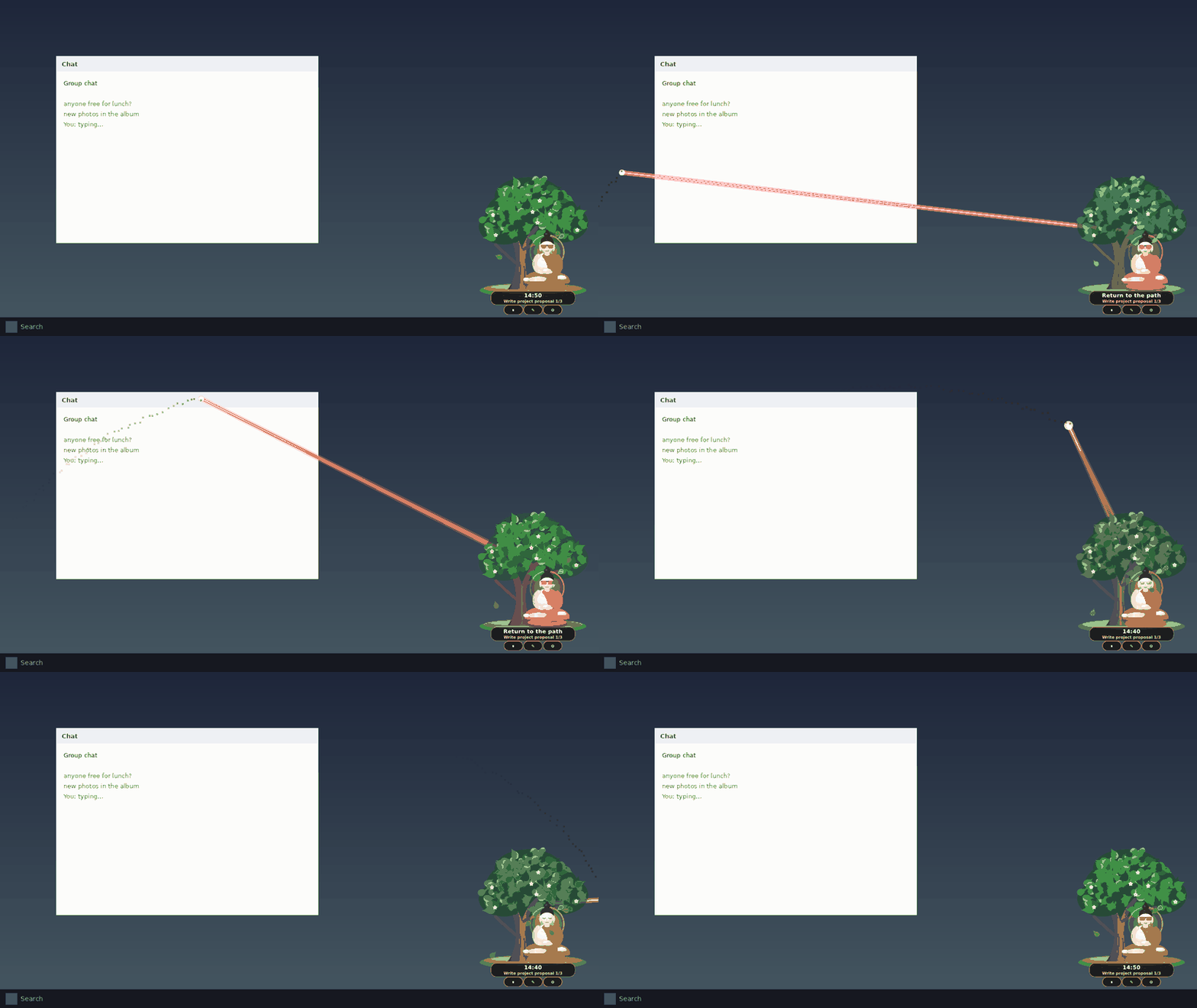
A peaceful Buddha who meditates under the Bodhi tree on your screen during deep work, gently nudges distractions with screen lasers, and guides mindful breathing breaks.
git clone https://github.com/afsalali1238/BodhiPomodoro.git

🛡️ Verified Safe, Private & Malware-Free
Built with complete transparency. Audit every single line of code yourself on GitHub.
Zero Malware or Adware
No bundled toolbars, miners, spyware, or background services. Packaged purely with official Electron and NSIS tools.
100% Local-First Data
Your session stats, tasks, and settings are saved locally on your machine in %LOCALAPPDATA%. Never uploaded to the cloud.
Zero Telemetry & Tracking
No analytics trackers, no Google Analytics, no error reporting pings, and no telemetry. Bodhi respects your full digital privacy.
No Hardcoded Secrets or Keys
The codebase is completely sanitized with zero hardcoded API keys or external server dependencies.
36/36 Automated Unit Tests Passing
Rigorous test suite verifying atomic disk writes, state transitions, break calculations, and distraction logic.
Opt-in AI Focus Evaluator
The AI focus pushback feature is strictly opt-in and only connects if you provide your own personal OpenAI or Gemini key.
Built for Peaceful Productivity
Everything you need to stay in flow without stressful alarms or noisy notifications.
Procedural SVG Companion
Hand-crafted procedural vector artwork that floats seamlessly on your desktop with a transparent background. He breathes rhythmically to synchronize your flow.
Gentle Distraction Lasers
Detects active distracting windows and gently fires harmless visual laser beams across your screen after a customizable grace period to guide you back.
Growing Bodhi Tree
Your tree flourishes through 5 visual growth stages as you complete focus sessions throughout the day, offering visual rewards for discipline.
Mindful Breaks
When focus ends, Bodhi walks behind the tree and provides peaceful guided box breathing, hydration reminders, or coffee rest nudges.
Quick 3-Click Setup
Pick your session duration (25m classic, 50m deep work, or custom), declare your goal, choose strict or ambient focus apps, and jump into work.
Daily Focus Journal
Track your completed cycles, focus minutes, and task history with local daily summaries and exportable Markdown reports.
💻 Clone & Build from Source
Inspect the code, run locally, or build your own custom executable.
# 1. Clone the official repository
git clone https://github.com/afsalali1238/BodhiPomodoro.git
# 2. Enter prototype directory & install dependencies
cd BodhiPomodoro/prototype && npm install
# 3. Launch the desktop pet in development mode
npm start
# 4. Run automated test suite (36/36 tests)
npm test
# 5. Build your own Windows NSIS installer .exe
npm run dist:win
Installation & Clean Uninstallation
Full support for standard Windows application management.
📥 How to Install
- Download
Bodhi Pomodoro Setup 0.3.0.exeusing the download button above. - Double-click the installer to start the setup wizard.
- Choose your preferred install directory (or leave default).
- Click Install. Desktop & Start Menu shortcuts are created automatically.
⚠️ Windows SmartScreen Notice
- Because this is an independent open-source release without an expensive ($400/yr) corporate certificate, Windows may show: "Windows protected your PC".
- Click "More info".
- Click "Run anyway".
- This is standard for all open-source Windows tools.
🗑️ How to Uninstall Cleanly
- Open Windows Settings (or press
Win + I). - Navigate to Apps > Installed apps (or Control Panel).
- Find Bodhi Pomodoro in the list.
- Click the three dots (
...) and select Uninstall. - The app, executables, and all shortcuts are completely removed.
npm run dist:portable to build a standalone single .exe that runs directly without installing anything.